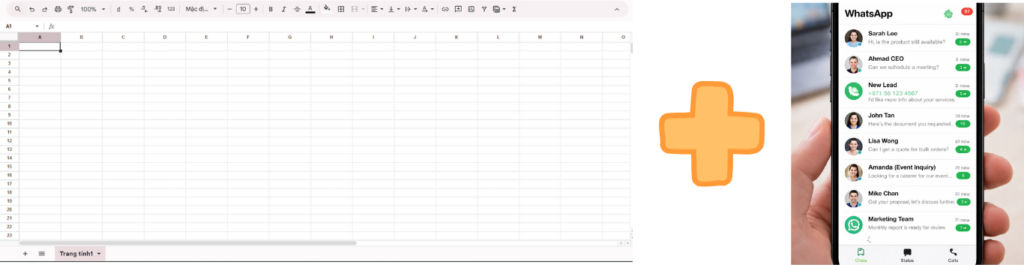
“If you’re running a business in Malaysia, Singapore or Dubai, chances are WhatsApp Business is your main sales inbox. But let’s be honest… your Google Sheets is probably a mess.
Imagine this: You get 30–50 WhatsApp messages per day. New leads asking about pricing, availability, or demos. You or your staff are manually copying phone numbers and pasting them into Sheets.
What actually goes wrong:
❌ Leads get missed: Especially during peak hours.
❌ Human error: Phone numbers saved incorrectly.
❌ No follow-up: You lose track of who was interested in what.
❌ Unprofessionalism: Slow response times kill deals.
Manual data entry is the silent killer of your sales conversion
Bonus: I’ll also show you how to use AI to automatically score these leads before they even hit your spreadsheet.
The Solution: The “Magic” of Make.com
💬
WhatsApp
Receive Msg
➝
🧠
OpenAI
Analyze & Summarize
➝
📊
Sheets
Save Clean Data
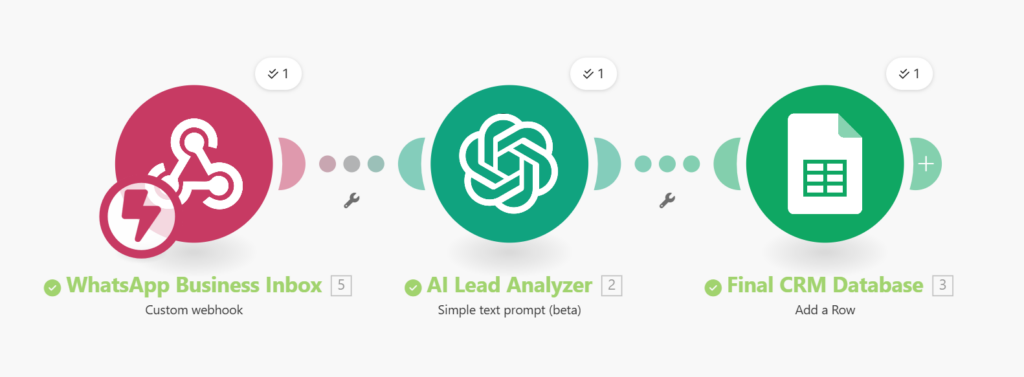
Figure 1: The complete automated workflow powered by AI.
For WhatsApp-to-Sheets automation, Make.com hits the sweet spot. It’s the “brain” that connects your apps while you sleep.
Why professionals choose Make.com over Zapier:
💰 Cost-Effective: Significantly lower cost per task.
⚙️ Visual Logic: You can see exactly how your data flows.
🚀 Enterprise Ready: Scalable for thousands of leads.
🎁 Exclusive: Get 1 Month PRO Plan for FREE via this link
High-Level Architecture
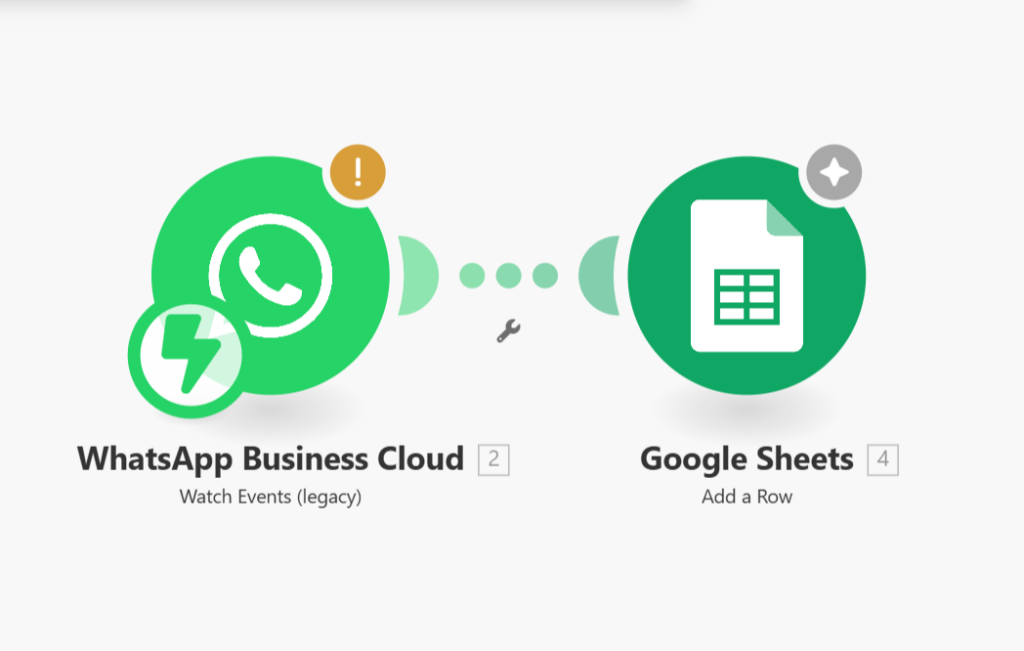
Here is the workflow we are building: WhatsApp Message ➔ Make.com (The Logic) ➔ Google Sheets (The Database)
A smart 3-step workflow: Capture, Analyze with AI, and Sync.
Step-by-Step: How to Connect Them
Step 1: Choose Your WhatsApp Connector
WhatsApp doesn’t allow direct automation from the standard app. You need an official API or a connector tool like TimelinesAI, Zoko, or WATI. These tools act as the bridge to Make.com.
To keep things fast and secure, I use a Webhook connection to bring WhatsApp messages into my automation brain. This is the most reliable method for businesses that handle high lead volumes
Step 2: Set the Trigger in Make.com
Inside Make.com, create a new Scenario. Choose your WhatsApp tool as the Trigger (e.g., “New Incoming Message”).
Step 3: Map the Data to Google Sheets
Add the Google Sheets module (“Add a Row”). This is where you tell Make:
“Take the Sender Name and put it in Column A.”
“Take the Phone Number and put it in Column B.”
“Add a Timestamp in Column C.”
Expert Tip: Add an “AI Brain” to Your Sales
This is how my clients in Dubai stay ahead of the competition. By adding an OpenAI (ChatGPT) module in the middle, you can:
Summarize the Lead: “Interested in 3-bedroom villa, budget $2M.”
Sentiment Analysis: Identify if the lead is “Hot” or just “Browsing.”
Auto-Reply: Send an instant, personalized greeting while the lead is still on their phone.
Use AI to pre-qualify your leads before you even open the app
👇
“Real-time data from our Real Estate Automation test.”
Why This Matters for Your Business
This isn’t just “tech stuff.” This is Business Leverage.
🚀 Instant Speed: Respond to leads in seconds, not hours.
📊 Clean Data: Your CRM is always up to date.
🧠 Mental Clarity: Stop worrying about “forgetting someone.”
Final Thoughts
If you’re still manually saving WhatsApp leads in 2026, you’re not just wasting time—you’re losing money to faster competitors.
Ready to automate?
READY TO AUTOMATE YOUR EMPIRE?
Stop doing manual data entry today. Join 500,000+ experts using Make to scale their business effortlessly.
*Limited time offer for new accounts created via this link.
By using my link, you support this blog and get access to practical automation templates that I’ve tested in real-world markets like Singapore and the UAE.
Transparency & Disclaimer:This guide is for educational purposes only. Some links in this post are affiliate links, meaning I may earn a commission at no extra cost to you if you sign up (in fact, you get a 1-month PRO bonus!). I only recommend tools like Make.com because I use them daily to run my own business automation. Results may vary based on your configuration.