If you’re a TikToker, content creator, or freelancer, let me guess your daily routine:
- Download TikTok video
- Find a watermark remover
- Re-upload to Facebook Reels
- Re-upload again to YouTube Shorts
- Repeat… every single day 😩
That’s not “content creation”.
That’s manual labor.
In this 2026-ready guide, I’ll show you how to fully automate this workflow using Make.com, why it’s far better than Zapier or Repurpose.io for video, and—most importantly—why you must unlock 10,000 Operations to avoid hitting painful limits when dealing with heavy video files.
1. Introduction: The Hidden Cost of Manual Reposting
Manually reposting short-form videos isn’t just annoying—it’s expensive.
The real costs:
- Time: 20–30 minutes per video
- Focus: Constant context switching (killing your creativity)
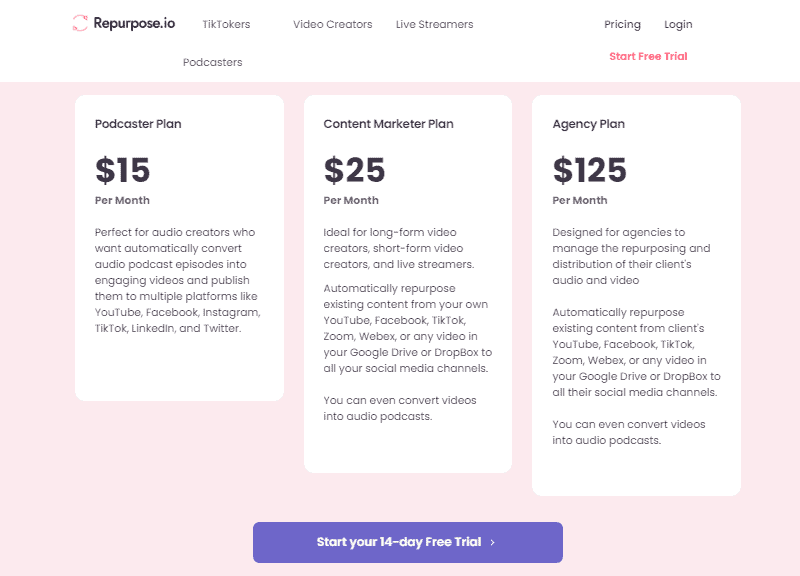
- Money: Tools like Repurpose.io cost $25/month (and still limit flexibility)
Meanwhile, Make.com lets you build the same automation:
- For free (testing)
- Or much cheaper at scale
- With far more control
👉 The catch? Video automation is “heavy” on data.
And this is where most beginners mess up (we’ll fix that in section 3).
2. The Strategy: “Write Once, Publish Everywhere”
The smartest creators in 2026 don’t repost manually.
They use a Write Once, Publish Everywhere system.
The Automation Flow (Simple but Powerful):
- TikTok (Source)
- → Watermark-Free Video Downloader
- → Google Drive (Backup Library)
- → Facebook Reels + YouTube Shorts (Distribution)
Once this is live:
- Post once on TikTok.
- Everything else happens automatically.
- Your content becomes a distribution machine.
Why Make.com Beats Zapier (Especially for Video)
| Feature | Make.com | Zapier |
| Video file handling | ✅ Excellent | ❌ Painful |
| Operation cost | ✅ Cheaper | ❌ Expensive |
| Visual workflow | ✅ Yes | ❌ Limited |
| Multi-platform posting | ✅ Native | ⚠️ Restricted |
Zapier is great for text. Make is built for media.
3. 🔥 The “Secret Sauce”: Why You NEED the 10,000 Ops Upgrade (CRUCIAL)
This is the most important section. Read carefully.
❌ The 1,000 Operations Trap
Make.com’s standard free plan gives 1,000 operations/month.
Sounds fine… until you automate video.
Here’s the truth:
- Watching a TikTok video = 1 op
- Downloading the video file = 1–2 ops
- Uploading to Google Drive = 1 op
- Posting to Facebook = 1 op
- Posting to YouTube Shorts = 1 op
👉 One video = 5–7 operations
Now do the math:
2 videos/day × 30 days × 7 ops = 420+ operations/month
Add testing, retries, errors, and edits…
💥 You’ll hit the limit mid-month.
And when that happens? Automations stop. Videos don’t post. You lose consistency.
✅ Why 10,000 Operations = Peace of Mind
With the 10,000 Operations (1-Month Pro Trial) via our link:
- Video files? No stress.
- Daily posting? Covered.
- Scaling to multiple platforms? Easy.
- Text automation is cheap. Video automation is HEAVY.
If you’re serious about short-form content, this upgrade is non-negotiable.
Do NOT rely on the standard free plan.
(Required for handling heavy video files)
4. Step-by-Step Tutorial: Auto-Sync TikTok to Reels & Shorts (Make.com)
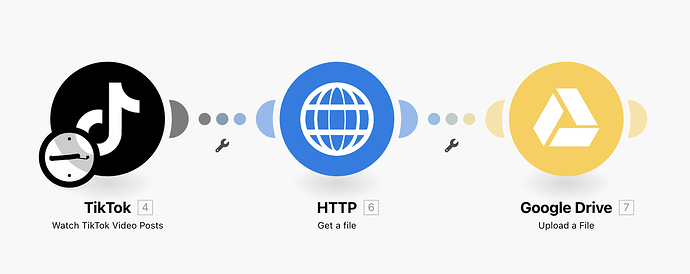
Caption: The complete automation workflow: Listen -> Download -> Backup.
🔹 Step 1: Create a New Scenario + TikTok Trigger
- Log in to Make.com.
- Click Create a new Scenario.
- Add module: TikTok → Watch Videos.
- Connect your TikTok account.
- Choose: New videos only (From your own profile).
✅ This module listens for every new TikTok post.
🔹 Step 2: Download the Video (No Watermark)
TikTok’s raw video URL often contains a watermark. To remove it:
- Add module: HTTP → Get a file.
- Use a no-watermark video URL (Many TikTok APIs provide this, or simple regex can extract it).
- Set Method: GET.
⚠️ This is a heavy operation (remember Section 3).
🔹 Step 3: Backup Everything to Google Drive
Never rely on social platforms alone.
- Add module: Google Drive → Upload a File.
- Choose a folder like:
/Shorts/TikTok_Backups. - Map: File = Output from HTTP module.
Now you have: A permanent archive, reusable content, and protection against account bans.
🔹 Step 4: Auto-Publish to Facebook Reels & YouTube Shorts
Option A: Facebook Reels
- Add module: Facebook Pages → Create a Page Video.
- Map: Video file & Caption (reuse TikTok text).
Option B: YouTube Shorts
- Add module: YouTube → Upload a Video.
- Set Title, Description, and Visibility (Public).
- Ensure video is vertical (9:16).
💡 Pro Tip: Use Iterators for Multi-Platform Scaling
Want to post to Facebook, YouTube, AND Instagram later?
Use an Iterator module: One video in → Multiple destinations out.
This is where Make truly shines compared to Zapier.
5. Conclusion: Save 10+ Hours/Month (And Scale Smarter)
Let’s recap:
- Manual reposting = wasted time
- Repurpose.io = $25/month
- Make.com = more control + cheaper
- Video automation = high operation usage
Most creators save 8–12 hours per month with this setup.
That’s time you can reinvest into better hooks, more content, or more revenue.
🚨 Final Reminder:
If you automate video on the free plan, you will hit limits.
Grab the 10,000 Operations Upgrade before slots run out:
Ready to build your Content Machine?
Don’t let the 1,000 limit stop your growth. Unlock the Pro Trial now.
CLAIM YOUR 10,000 OPS GIFT →⚡ Status: Upgrade slots are filling up fast.

Automation Architect | Certified Make.com Expert helping businesses in Dubai & Singapore scale faster. Specializes in Real Estate CRM & No-Code workflows. Let’s turn your manual chaos into a money-making machine.