“If you are running Facebook Ads and still downloading CSV files manually, you are losing money. Here is the 5-second fix.”
The “5-Minute Death” of a Lead ☠️
Did you know that replying to a lead within 5 minutes increases conversion rates by up to 9x?
Now here’s the uncomfortable truth:
Most real estate agents, car dealers, and agencies in Dubai and Singapore still download Facebook leads manually.
- CSV export.
- End of day.
- “I’ll call them later.”
By the time you call, that lead is:
❌ Cold.
❌ Already contacted by 2–3 competitors.
❌ No longer emotionally engaged.
In fast-moving markets like UAE and Singapore, speed isn’t a “nice to have”.
Speed to Lead is the deal-breaker.
⚡ Too Busy? Get the 5-Second Solution:
Stop wasting time on manual CSV exports. Sync your Facebook Leads to Google Sheets & SMS instantly.
- ✔ Instant Sync: Leads appear in Sheets in < 5 seconds.
- ✔ Fast Response: Alert your sales team via SMS/WhatsApp.
- ✔ Easy Setup: No coding required. 15-min setup.
Join 500,000+ businesses using Make. Exclusive for SmartWorkHacks readers.
The Modern Solution
When a lead submits a Facebook form:
- Your phone should ring in 5 seconds.
- Your sales team should get notified instantly.
- The prospect should receive a confirmation SMS or WhatsApp automatically.
No humans. No waiting. No excuses.

Imagine getting this notification instantly. This is what speed looks like.
The Architecture: The “Instant Response” Machine ⚡
This is the exact system high-performing agencies use to win deals before competitors even open their laptops.
🔁 The Workflow (Simple but Powerful)
- Trigger: Facebook Lead Ads (Event: New Form Submission)
- Action #1: Google Sheets (Add Row)
- Purpose: Backup, reporting, CRM sync.
- Action #2: Team Notification (Slack / Telegram / Email)
- Message example: “🔥 NEW HOT LEAD – Call Now: Michael Tan | +65 9123 XXXX”
- Action #3 (Optional): SMS / WhatsApp to the Lead
- Example: “Hi Michael, we received your inquiry regarding Marina Bay View. Our consultant is calling you now.”
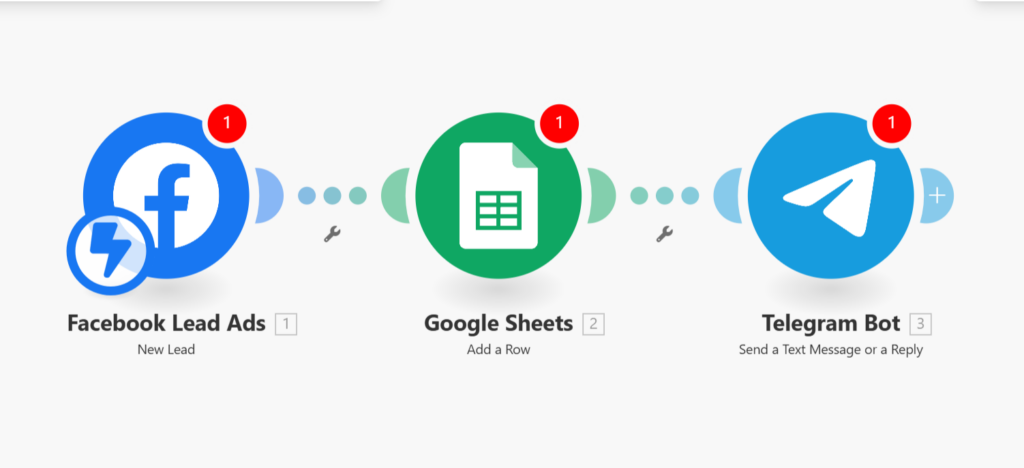
Simple setup: Facebook -> Google Sheets -> Telegram.
Why Make.com Beats Zapier (Especially for Agencies)
Let’s be blunt. Zapier is fine… until you scale.
| Feature | Zapier | Make.com |
| Cost at Scale | ❌ Expensive ($50+/mo) | ✅ Affordable (Pay per op) |
| Logic | ❌ Linear (Simple) | ✅ Visual Router (Advanced) |
| Complexity | ❌ Struggles with multi-step | ✅ Built for Business Logic |
| Visibility | ❌ List view (Hard to debug) | ✅ Visual Blueprint (Clear) |
The Verdict: For B2B automation, Make.com is built for grown-ups.
Step-by-Step: Build This Automation (Technical but Simple)
You don’t need to be a developer. Just follow this blueprint.
Step 1: Create Your Facebook Lead Form
- Go to Facebook Ads Manager.
- Create a Lead Ad asking for: Name, Phone, Email.
Step 2: Create a Make.com Scenario
Module 1: Facebook Lead Ads – “Watch Leads”
- Connect your Facebook account.
- Select the correct Page + Form.
- ⚠️ Note: Connection usually requires Admin rights.
Module 2: Google Sheets – “Add a Row”
- Connect Google account.
- Map fields: Name → Name column, Phone → Phone column.
Module 3: Telegram Bot / Slack – “Send Message”
- Message template:🔥 NEW LEAD ALERTName:
{{1.full_name}}Phone:{{1.phone_number}}ACTION: CALL NOW!
Step 3: Test Everything
Use the Facebook Lead Testing Tool to submit a fake lead.
If your phone doesn’t “ting” in 5 seconds, you’re doing it wrong.
⚠️ Business-Grade Warning (Read This Carefully)
This is where most agencies screw up.
The Free / 1,000 Ops Plan is DANGEROUS for business use.
If you generate 50+ leads per day, here’s the math:
- 1 Lead = 3–4 Operations (Facebook + Sheet + Telegram + SMS).
- 50 leads/day = ~200 ops/day.
- Result: You hit the 1,000 limit in 5 days.
Imagine this nightmare:
The scenario stops working. No alerts. Leads keep coming in on Facebook, but your phone is silent.
You just lost a $30,000 deal because you wanted to save $9 on software.
That’s not smart. That’s reckless.
The Only Safe Option for Agencies
To run this 24/7, with zero delay and high volume, you need breathing room.
You need the 10,000 Operations (1-Month Pro Trial) to handle thousands of leads without crashing.
(Free Upgrade: Get 1 Month Pro Plan via this link)
Final Words: Speed Is Money 💰
“In high-stakes markets like Dubai and Singapore, the factor that determines if you close a lead or lose it is…”
- Not the cheapest.
- Not the most experienced.
- But the one who is the FASTEST
Manual lead handling is silently killing your sales. Automation is no longer “advanced technology” — it’s the new minimum standard.
Set this up today, and start closing more deals tomorrow.
Ready to Scale Your Agency?
Don’t let manual work kill your growth. Get the 10,000 Operations Pro Plan for free and build your automated empire today.
👉 CLAIM YOUR 1-MONTH PRO TRIAL NOWLimited time offer for Smart Work Hacks readers.
“Trusted by 500,000+ companies worldwide. 80% reduction in lead response time reported by users.”

Automation Architect | Certified Make.com Expert helping businesses in Dubai & Singapore scale faster. Specializes in Real Estate CRM & No-Code workflows. Let’s turn your manual chaos into a money-making machine.