Imagine this 👇
You wake up, open Google Search Console, and see 10 brand-new articles already published on your blog—optimized, formatted, illustrated, and indexed—while you were sleeping.
- No writing.
- No editors.
- No $50-per-article freelancers.
Just a Set & Forget AI Content Machine running quietly in the background.
In this guide, I’ll break down exactly how I built a fully automated blog system using WordPress + ChatGPT + DALL·E 3—and why Make.com is the only tool that makes this possible at scale.
If you’re a blogger, SEO specialist, or affiliate marketer who hates writing manually, this is your unfair advantage.
1. Introduction: From Writer’s Block to Content on Autopilot
The Dream
“Imagine waking up to 10 high-ranking articles on your blog without lifting a finger.”
That’s not hype. That’s automation.
The Reality (Before Automation)
- ❌ Writing is mentally exhausting.
- ❌ Hiring writers costs $20–$50 per article.
- ❌ Scaling content = scaling costs.
- ❌ Consistency breaks the moment you get busy.
The Solution
A fully automated AI blog machine powered by:
- Make.com (the automation engine)
- ChatGPT (the brain)
- DALL·E 3 (the artist)
- WordPress (the publisher)
Once built, it runs 24/7.
2. The Architecture: How the AI Blog Machine Works
This system is built on Iterator logic—one input, repeated execution.
🔁 The Core Workflow:
- Trigger – Google Sheets (Keyword Engine): A simple spreadsheet becomes your command center.
- The Brain – ChatGPT (Multi-Step Writing): Generate outline -> Write long-form article -> Polish for SEO.
- The Artist – DALL·E 3 (Visuals at Scale): Generate a unique featured image per article.
- The Publisher – WordPress (Auto-Posting): Publish instantly with correct formatting.
📌 Result: One keyword in → One finished article out. No human intervention.
3. ⛽ The “Fuel” Warning: Why Most AI Content Machines FAIL
This is the part most tutorials don’t tell you.
⚠️ Long-Form AI Content Is EXPENSIVE (In Operations).
Text + images ≠ cheap automation. Let’s break it down 👇
The Math (Realistic)
1 Article Uses ~50 Operations
(Keyword search + Outline + Draft + SEO + Image Gen + Upload + Update Sheet)
What That Means for You:
| Feature | Free Plan (1,000 Ops) | Pro Trial (10,000 Ops) |
| Capacity | ❌ 3–5 Articles/month | ✅ ~200 Articles/month |
| Stability | ❌ Crashes immediately | ✅ Zero crashes |
| Growth | ❌ Useless for scaling | ✅ Media Company Scale |
💡 The Truth: If you try to run this machine on the free plan, it WILL stall after just a few days.
That’s why you must unlock the 10,000 Operations (1-Month Pro Trial) before going live.
(Required for handling heavy AI generation)
4. Step-by-Step Tutorial: Build the AI Blog Machine in Make.com
Let’s get technical—but simple.
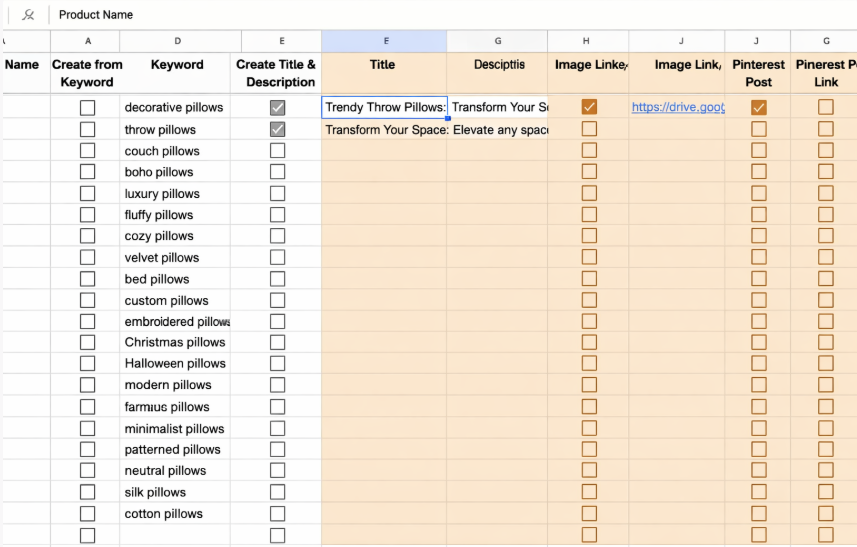
🔹 Step 1: Google Sheets Setup (Your Control Panel)
Create a Google Sheet with these columns:
- Keyword → Target search term
- Status → Pending / Published
- Live Link → URL after publishing
Caption: Simple setup. Add keywords, and the machine does the rest.
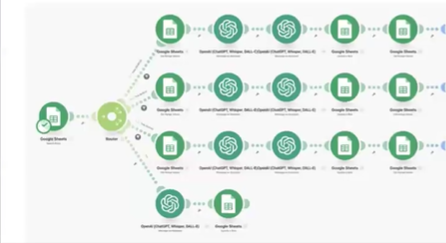
🔹 Step 2: Create the Make.com Scenario (The Magic)
Caption: The full workflow: Sheet -> GPT -> DALL-E -> WordPress.
Module 1: Google Sheets – Search Rows
- Filter:
Status = Pending - This allows iteration over multiple keywords.
Module 2: OpenAI (ChatGPT) – Create Outline
- Prompt: “Write a comprehensive SEO-friendly outline for a blog post targeting the keyword: [Keyword].”
Module 3: OpenAI (ChatGPT) – Write Full Article
- Prompt: “Write a 1,500-word, SEO-optimized article based on this outline. Use clear headings, short paragraphs, and actionable advice.”
- ⚠️ This is the largest ops consumer.
Module 4: OpenAI (DALL·E 3) – Generate Featured Image
- Prompt: “Create a modern blog featured image illustrating the topic: [Keyword]. Minimalist, professional, SEO blog style.”
🔹 Step 3: WordPress – Create a Post
Use the WordPress module:
- Title → Keyword
- Content → Article text (from Module 3)
- Featured Image → DALL·E output (from Module 4)
- Status → Published
🔹 Step 4: Update Google Sheet
Final module:
- Update row
- Status → Published
- Live Link → WordPress URL
- This prevents duplicate posts and keeps the machine clean.
5. Conclusion: You’re Not Blogging—You’re Building an Asset
This isn’t “AI writing”. This is content infrastructure.
- Your blog publishes while you sleep.
- Your traffic compounds daily.
- Your affiliate links work 24/7.
But remember 👇
A machine without fuel stops.
🚨 Final Warning:
If you don’t upgrade, your scenario will hit the 1,000 ops wall and crash after just 5 articles.
Don’t sabotage your own system. Get the 10,000 Operations (1-Month Pro Trial) and let it run daily without limits.
Ready to build your Content Machine?
Don’t let the 1,000 limit stop your growth. Unlock the Pro Trial now.
CLAIM YOUR 10,000 OPS GIFT →⚡ Status: Upgrade slots are filling up fast.

Automation Architect | Certified Make.com Expert helping businesses in Dubai & Singapore scale faster. Specializes in Real Estate CRM & No-Code workflows. Let’s turn your manual chaos into a money-making machine.